Bus Topology
The bus network topology connect all the computer systems, servers and printers to one cable, which is known as the bus. At each end of the cable a terminator is fitted to stop signals reflecting back down at the bus.

In the above diagram, I have shown how a bus network works, connecting all the computers (workstations), servers and printers to one cable (the bus).
The advantages of the bus network are that they are easy to set-up and install, easy to add more systems and they use less cables than most other networks e.g. the star topology. However, there are disadvantages which are; if there is an issue with the main central cable, the entire network wouldn't work, data can travel slowly if there are a lot of systems on the network, data collisions can happen when the network is busy and also there is a low level of network security, meaning that all computer systems can see the data on the network.
Ring Topology
In a ring network each system and device is connected to two other devices either side. This forms a ring for the signals to travel around and each packet of data on the network travels in one direction, while each device receives each packet in turn until the destination device receives it.
In the above diagram, I have shown how the ring network topology works, each device/system has another device/system either side of it form a ring/circle.
The advantages of this type of network is that it can transfer data fairly quickly, even if there are a large number of devices connected because the data only flows in one direction. Another advantage is that there won't be any data collisions.
The disadvantages are that if one device/system has been shutdown or is inactive then the whole network will be down. Also if there is an issue on the network it can be hard to identify, therefore, making it hard to troubleshoot and resolve.
Star Topology
The star topology is a network that consists of central computer with connected nodes surrounding it, the greatest advantage to this topology is that if one node were to go down, then it would not affect the rest. However, if the main central computer system were to function incorrectly, then the whole network would be rendered 'down'.
 This diagram illustrates the star topology, as I have described the main central computer which is often known as the 'hub', connects all computers on a server to that one system. If one node were to be down or non-functional this wouldn't affect the other systems, however if the main central hub were to be down, then this would render the entire network down; offline and inactive.
The disadvantages of this network are that it can be expensive to set-up and install, due to the amount and cost of the required cables. Another thing that adds to the cost and therefore is considered a disadvantage is the amount of extra hardware needed, these can be hubs and switches.
Tree (Hierarchical) TopologyThe Tree topology is also known as the 'Star-bus topology' because the network set-up is similar to that of a Star and Bus topology. The Tree topology connects multiple Star topologies together, if the main cable which connected the two Star topologies failed, the multiple Star topologies would be unable to to communicate. However, the the systems on the individual topologies would still be able to function and communicate.
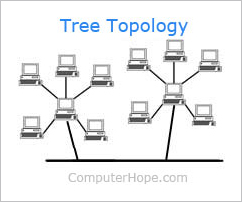
The advantages of Tree topologies are that expansion is easy and error detection and correction is also made simple. Another advantage to this topology is that when a node becomes damaged, it does not affect the remaining others.
However, there are disadvantages which are due to the basic structure of the Tree topology, that means the whole network heavily relies on the main bus cable, and if that breaks the entire network becomes somewhat 'crippled' and therefore rendered useless. Even though there is room for expansion regarding this topology, the more nodes that are added, the more complex maintenance becomes.
Mesh Topology
The mesh network topology is a form of LAN (Local Area Network) that has two variants; full mesh topology or partial mesh topology. Every node in the network is at least connected to two other nodes. The mesh network does not require an internet connection in order to be able to communicate amongst themselves.

Above I provided a diagram which should help learners understand how a mesh topology works, although the connections look like a star, the outer connections define it to make it into a mesh topology.
The advantages of the mesh topology are that data can be sent to and from different devices simultaneously, if a component fails there is usually always an alternative way to transfer data.
The disadvantages are that the cost is very high compared to the costs of the other topologies
SkyNet - SH
Thank you for reading through today's post, all about Network topologies that can make-up a network.
In a ring network each system and device is connected to two other devices either side. This forms a ring for the signals to travel around and each packet of data on the network travels in one direction, while each device receives each packet in turn until the destination device receives it.
In the above diagram, I have shown how the ring network topology works, each device/system has another device/system either side of it form a ring/circle.
The advantages of this type of network is that it can transfer data fairly quickly, even if there are a large number of devices connected because the data only flows in one direction. Another advantage is that there won't be any data collisions.
The disadvantages are that if one device/system has been shutdown or is inactive then the whole network will be down. Also if there is an issue on the network it can be hard to identify, therefore, making it hard to troubleshoot and resolve.
Star Topology
The star topology is a network that consists of central computer with connected nodes surrounding it, the greatest advantage to this topology is that if one node were to go down, then it would not affect the rest. However, if the main central computer system were to function incorrectly, then the whole network would be rendered 'down'.
The disadvantages of this network are that it can be expensive to set-up and install, due to the amount and cost of the required cables. Another thing that adds to the cost and therefore is considered a disadvantage is the amount of extra hardware needed, these can be hubs and switches.
Tree (Hierarchical) TopologyThe Tree topology is also known as the 'Star-bus topology' because the network set-up is similar to that of a Star and Bus topology. The Tree topology connects multiple Star topologies together, if the main cable which connected the two Star topologies failed, the multiple Star topologies would be unable to to communicate. However, the the systems on the individual topologies would still be able to function and communicate.
The advantages of Tree topologies are that expansion is easy and error detection and correction is also made simple. Another advantage to this topology is that when a node becomes damaged, it does not affect the remaining others.
However, there are disadvantages which are due to the basic structure of the Tree topology, that means the whole network heavily relies on the main bus cable, and if that breaks the entire network becomes somewhat 'crippled' and therefore rendered useless. Even though there is room for expansion regarding this topology, the more nodes that are added, the more complex maintenance becomes.
Mesh Topology
The mesh network topology is a form of LAN (Local Area Network) that has two variants; full mesh topology or partial mesh topology. Every node in the network is at least connected to two other nodes. The mesh network does not require an internet connection in order to be able to communicate amongst themselves.
Above I provided a diagram which should help learners understand how a mesh topology works, although the connections look like a star, the outer connections define it to make it into a mesh topology.
The advantages of the mesh topology are that data can be sent to and from different devices simultaneously, if a component fails there is usually always an alternative way to transfer data.
The disadvantages are that the cost is very high compared to the costs of the other topologies
SkyNet - SH
Thank you for reading through today's post, all about Network topologies that can make-up a network.

No comments:
Post a Comment